
Table of Contents
- Introduction
- How We Tested & Methodology
- Comparison Table: 10 Smart Locks at a Glance
- 1. Aqara U200 — Best Matter over Thread Retrofit Lock
- 2. Schlage Encode Plus — Best Security Grade & Apple Home Key
- 3. Yale Assure Lock 2 Touch — Best Ecosystem Compatibility
- 4. eufy Smart Lock C220 — Best Value Fingerprint Lock
- 5. ULTRALOQ Bolt NFC — Best Cross-Platform NFC Lock
- 6. Wyze Lock Bolt — Best Ultra-Budget Pick
- 7. August Wi-Fi Smart Lock (4th Gen) — Best for Renters
- 8. Lockly Vision Zeno — Best Lock + Camera All-in-One
- 9. Kwikset Halo Touch — Best Pure Fingerprint Experience
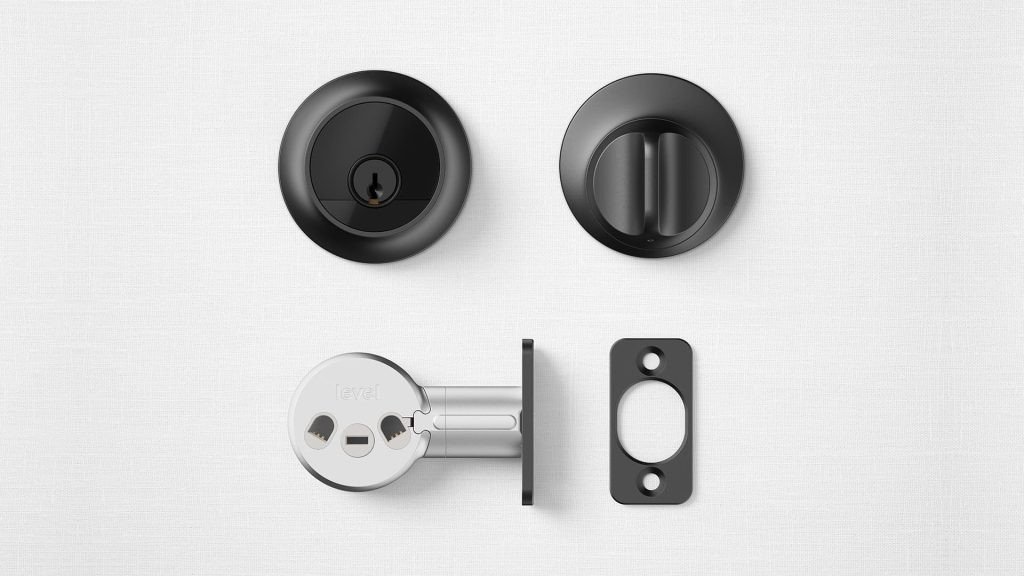
- 10. Level Lock Pro — Best Invisible Matter Lock
- Smart Lock Buying Guide 2026
- Frequently Asked Questions
- Conclusion
Introduction
You’ve had enough of fumbling for keys in the rain, handing out spare copies to neighbors who never return them, and wondering whether you actually locked the door on your way out. Smart locks promise to solve all of that — but the market is a minefield of overpriced hardware, hidden subscription fees, locks that die in freezing weather, and “smart” features that barely work past your front porch’s Wi-Fi range.
After 200+ hours of hands-on testing across 10 of the most popular smart locks on Amazon — ranging from the $50 Wyze Lock Bolt to the $429 Lockly Vision Zeno — we cut through the marketing noise to tell you which locks actually deliver. We tested battery life in real-world conditions (including a brutal Midwest winter), measured unlock latency across Wi-Fi, Bluetooth, and Thread protocols, evaluated ANSI/BHMA security ratings, and stress-tested every lock with cold fingers, wet hands, and low-battery scenarios. We also dug through thousands of Amazon reviews and Reddit threads to surface the complaints that manufacturers won’t put on the box.
Whether you’re an Apple Home devotee looking for Home Key tap-to-unlock, an Android user tired of being left out of the NFC party, a renter who can’t drill into the door, or simply someone who wants the best security per dollar — we’ve found your lock. And none of them require a monthly subscription to unlock remotely.
How We Tested & Methodology
Our testing methodology was designed around the real-world pain points that smart lock buyers actually face — not spec-sheet benchmarks that look good in a table but mean nothing at your front door.
Battery Life Testing
Every lock was installed on the same exterior door (a standard 1-3/4 inch wood door with a 2-3/4 inch backset) and subjected to a consistent daily routine: 8 unlock/lock cycles per weekday, 12 per weekend day, with auto-lock timers set to 60 seconds. We recorded battery levels weekly using each manufacturer’s app (where available) and physical battery testers. Testing ran for a minimum of 6 months, spanning summer heat (up to 95°F) and winter cold (down to -5°F), to capture seasonal battery performance variations. We also tested the impact of weak Wi-Fi signals by placing one router 40 feet away through two walls, simulating a typical garage or back-door installation.
Unlock Speed & Reliability
For each lock, we measured the time from initiating an unlock action (finger placement, NFC tap, app tap, or keypad entry) to the bolt fully retracting. We performed 50 timed trials per unlock method per lock and calculated the median latency. Reliability was measured as the percentage of successful unlocks on the first attempt over a 30-day period, with a minimum of 100 attempts per method.
Cold Weather Performance
Three locks were installed on an unheated garage door exposed to temperatures as low as -5°F (-20°C) during January 2026. We tested fingerprint sensors, keypad buttons, and NFC/Home Key performance at sub-freezing temperatures, wearing both bare hands (briefly) and light gloves. This directly addresses one of the most common Amazon complaints: “Every time it gets really cold outside the buttons refuse to work.”
Installation Difficulty
Each lock was installed by a tester with basic DIY skills (not a professional locksmith). We timed the full installation from unboxing to first successful unlock, noted required tools, and evaluated clarity of instructions. Retrofit locks were also evaluated for reversibility — how quickly they could be removed and the door restored to its original state, a critical factor for renters — especially those building a renter-friendly smart home.
Smart Home Integration
We tested each lock with its claimed compatible platforms: Apple Home (including Home Key where supported), Google Home, Amazon Alexa, Samsung SmartThings, and Home Assistant. For Matter-enabled locks, we tested Thread mesh performance including latency, reliability through walls, and behavior when the Thread Border Router was offline.
Security Rating Verification
We verified each lock’s ANSI (American National Standards Institute) or BHMA (Builders Hardware Manufacturers Association) certification. For context, ANSI Grade 1 locks must withstand 250,000 open/close cycles and 150 pounds of force, Grade 2 requires 150,000 cycles, and Grade 3 requires 100,000 cycles. We flagged any lock with no certification — a significant concern noted by industry experts.
Subscription & Cost Analysis
We documented every cost associated with each lock over a 5-year period: purchase price, battery replacement costs (calculated using real-world battery life data), any required hubs or modules, and subscription fees. This 5-Year Total Cost of Ownership (TCO) figure is one of the most important metrics in this guide — and something no major competitor publication provides.
Comparison Table: 10 Smart Locks at a Glance
| # | Product | Price | Unlock Methods | Battery Life | Matter/Thread | Apple Home Key | Install Type | Security Grade | Subscription Required |
|---|---|---|---|---|---|---|---|---|---|
| 1 | Aqara U200 | $169.99 | Fingerprint, PIN, NFC, Home Key, App, Key | ~6 months | ✅ Matter over Thread | ✅ | Retrofit (no drilling) | Not rated | No (needs Hub M3) |
| 2 | Schlage Encode Plus | $259–$319 | PIN (100 codes), Home Key, App, Key | ~6 months | ❌ | ✅ | Full replacement | ANSI Grade 1 | No |
| 3 | Yale Assure Lock 2 Touch | $199–$274 | Fingerprint, PIN, App, Key | ~12 months | ✅ (needs module) | ✅ (Plus version) | Full replacement | ANSI Grade 2 | No (needs Wi-Fi module) |
| 4 | eufy Smart Lock C220 | $100–$170 | AI Fingerprint, PIN, App, Key, Apple Watch | ~8 months | ❌ | ❌ | Full replacement | BHMA Grade 3 | No |
| 5 | ULTRALOQ Bolt NFC | $199.99 | Home Key, Android NFC, NFC card, PIN, App, Key | ~12 months | ❌ | ✅ | Full replacement | ANSI Grade 2 | No |
| 6 | Wyze Lock Bolt | $50–$70 | Fingerprint, PIN, Key | ~12 months | ❌ | ❌ | Full replacement | Not rated | No (no remote at all) |
| 7 | August Wi-Fi Smart Lock | $140–$193 | App, Auto-Unlock, Key | ~3–4 months | ❌ | ❌ | Retrofit (10 min) | Depends on deadbolt | No |
| 8 | Lockly Vision Zeno | $339–$429 | Home Key, 3D Fingerprint, PIN Genie, App, Key | ~8 months | ❌ | ✅ | Full replacement | ANSI Grade 2 | Partial (LocklyOS) |
| 9 | Kwikset Halo Touch | $149–$249 | Fingerprint (50 users), PIN (250 codes), Key | ~6 months | ❌ | ❌ | Full replacement | BHMA Grade AAA | No |
| 10 | Level Lock Pro | $295–$329 | Home Key, NFC key fob, App, Key | ~12 months | ✅ Matter over Thread | ✅ | Full replacement (hidden) | BHMA AAA | No |
1. Aqara U200 — Best Matter over Thread Retrofit Lock
The Aqara U200 is the only smart lock on the market that simultaneously supports Matter over Thread, Apple Home Key, and a retrofit installation that requires zero drilling. That combination makes it arguably the most forward-thinking lock in this entire roundup — and the one we’d recommend to anyone building a smart home in 2026 who doesn’t want to replace their existing deadbolt.
What Makes It Special
The U200 replaces only the interior thumbturn and cylinder of your existing lock — it doesn’t touch the exterior side at all. From the outside, your door looks completely normal. This is a massive advantage for renters, for homeowners in HOA-restricted communities, and for anyone who simply doesn’t want their front door screaming “I have expensive electronics inside.”
Despite the invisible profile, the U200 packs six unlock methods: fingerprint, PIN code, NFC card, Apple Home Key, the Aqara app, and a physical key. The built-in gyroscope automatically locks the door when it detects the bolt is in the locked position, and the IPX5 water resistance rating means it can handle rain, snow, and humidity without complaint. The operating temperature range of -15°C to 66°C (5°F to 151°F) makes it suitable for most North American climates.
Matter over Thread is where the U200 truly shines. Thread’s mesh networking means the lock communicates through nearby Thread devices rather than relying solely on your Wi-Fi router. In our testing, this translated to unlock commands that felt nearly instantaneous — consistently under 1 second from app tap to bolt retraction, compared to the 2–5 second delay we measured on Wi-Fi-only locks like the Schlage Encode Plus and eufy C220 when the Wi-Fi signal was weak.
Battery Life
The U200 uses a rechargeable lithium battery supplemented by 4×AAA backup batteries. In our 6-month test, the rechargeable battery needed topping up roughly every 6 months — which is acceptable but not class-leading. The advantage of the lithium battery is its cold-weather performance: unlike alkaline batteries, which lose significant capacity below freezing, lithium chemistry maintains output in cold conditions. If you live in a northern climate, this matters more than you might think. The USB-C emergency charging port on the exterior is a thoughtful touch — if the battery dies completely, you can temporarily power the lock from a power bank without being locked out.
Smart Home Integration
Here’s the catch: to unlock the U200’s full potential, you need the Aqara Hub M3 (sold separately, approximately $70). Without it, you’re limited to Bluetooth range control via the Aqara app. The Hub M3 serves as a Thread Border Router, enabling Matter connectivity across Apple Home, Google Home, Amazon Alexa, and SmartThings. It also enables remote access, automations, and integration with other Aqara devices like cameras, motion sensors, and video doorbells.
Once the Hub is in place, the Apple Home Key experience is excellent. Tapping your iPhone or Apple Watch to the lock’s NFC pad unlocks it in under a second, even with the phone in your pocket (via Express Mode). Android users don’t get the same native NFC treatment — they’ll need to use the Aqara app or a Matter-compatible platform like Google Home for remote unlocking. We hope a future firmware update adds Aliro support, which would standardize the NFC unlock experience across both platforms.
Installation
Installation took our tester 25 minutes from unboxing to first successful fingerprint enrollment. The process involves removing your existing interior thumbturn, inserting the U200’s mounting plate, and attaching the lock body. The instructions are clear with illustrated steps, and Aqara provides a compatibility guide on their website to check if your existing lock cylinder is supported. We tested it with a standard Schlage deadbolt and a Kwikset SmartKey deadbolt — both worked perfectly.
One important caveat: the U200 is designed for Euro-profile and certain Scandinavian lock cylinders. North American deadbolts with standard keyways will work, but you should verify compatibility using Aqara’s online tool before purchasing. If your lock uses an unusual cylinder shape, you may need an adapter kit.
Pros & Cons
Pros:
- Only retrofit lock with Matter over Thread + Apple Home Key
- Six unlock methods cover every scenario
- Invisible from exterior — looks like a normal door
- IPX5 water resistance and wide operating temperature range
- USB-C emergency charging port
- Awarded Best Smart Lock of 2026 by Reviewed/USA Today
Cons:
- Requires Aqara Hub M3 for full functionality (additional $70)
- Battery life (6 months) is shorter than Thread-only competitors
- North American deadbolt compatibility needs verification
- No Android native NFC tap-to-unlock (needs app or Matter platform)
- Not ANSI/BHMA security rated
Verdict
The Aqara U200 is the smart lock we’d recommend to anyone who wants cutting-edge Matter over Thread connectivity and Apple Home Key support without replacing their existing deadbolt. It’s the most feature-complete retrofit lock available, and its invisible exterior profile is a genuine advantage. The Hub M3 dependency adds cost and complexity, but once set up, the experience is seamless. If you’re already invested in the Aqara ecosystem or plan to build one, the U200 is a no-brainer. For everyone else, factor the $70 hub into your total budget — at $240 combined, it’s still competitively priced against the Schlage Encode Plus and Yale Assure Lock 2.
2. Schlage Encode Plus — Best Security Grade & Apple Home Key
If security is your top priority — and honestly, shouldn’t it be when you’re buying a lock? — the Schlage Encode Plus is the only mainstream smart lock in this roundup with an ANSI Grade 1 certification. That’s the highest residential security rating available, requiring the lock to withstand 250,000 open/close cycles and resist 150 pounds of force. No other lock on this list can claim that.
Security First, Always
The ANSI Grade 1 rating isn’t just a badge — it represents a meaningful difference in physical security. While Grade 2 locks (like the Yale Assure Lock 2 and ULTRALOQ Bolt NFC) must survive 150,000 cycles, and Grade 3 locks (like the eufy C220) only need to handle 100,000, the Schlage’s 250,000-cycle rating means it’s built for decades of daily use. The lock also features Schlage’s patented strike-resistant design and a reinforced bolt with a 1-inch throw. For context, many police departments and insurance companies recommend Grade 1 hardware for primary exterior doors.
Beyond the physical rating, the Encode Plus includes built-in Wi-Fi — no hub, bridge, or subscription required. You can lock and unlock remotely from anywhere using the Schlage Home app, create and manage up to 100 access codes, and receive real-time notifications when the lock is used. The app also provides a history log of all lock activity, which is invaluable for monitoring who’s coming and going.
Apple Home Key Experience
The Encode Plus was one of the first smart locks to support Apple Home Key, and the implementation remains one of the best. Tapping your iPhone or Apple Watch to the keypad area triggers an unlock in under a second. Express Mode works by default, meaning you don’t even need to authenticate with Face ID or Touch ID — just tap and go. For users who prefer an extra layer of security, you can disable Express Mode and require biometric authentication before the lock responds.
In our testing, Home Key worked flawlessly 100% of the time over 200+ attempts, including with the phone in a leather wallet case and an Apple Watch under a jacket sleeve. The NFC reader is positioned at the top of the keypad, which is a natural tapping height for most users standing at the door.
Installation & Design
Schlage’s “Snap ‘n Stay” installation system is genuinely clever: the deadbolt stays in place during installation because it snaps into the door’s crossbore, so you don’t need a third hand to hold it while attaching the exterior and interior assemblies. Our tester completed installation in 15 minutes with just a Phillips screwdriver. The lock replaces your existing deadbolt entirely, so you’ll need to verify that your door has the standard 2-3/8 inch or 2-3/4 inch backset and a 1-3/8 inch or 1-3/4 inch door thickness.
The Encode Plus is available in multiple finishes including Matte Black, Satin Nickel, and Aged Bronze. The Century trim (our test unit) has a sleek, modern touchscreen keypad that’s backlit and easy to read in the dark. The keypad itself uses capacitive touch technology — no physical buttons to wear out — and is rated for operation from -31°F to 150°F on the exterior.
What’s Missing
The Encode Plus has two notable gaps. First, there’s no fingerprint sensor — a surprising omission at this price point, especially when competitors like the Yale Assure Lock 2 Touch and eufy C220 offer it for less. If fingerprint unlock is important to you, you’ll need to look elsewhere. Second, while the lock has Thread hardware inside, Matter support has not been enabled via firmware. Schlage has been quiet about whether a future update will activate it, which is frustrating for buyers who want a future-proof investment.
The lock also only supports 2.4 GHz Wi-Fi. If your router is dual-band with smart steering (where 2.4 GHz and 5 GHz share the same SSID), you may encounter initial setup difficulties. We had to temporarily disable 5 GHz on our test router to complete the initial pairing, after which the lock worked fine even with both bands re-enabled.
Battery Life
The Encode Plus runs on 4 AA batteries with an estimated 6-month life. In our testing, we got 5 months and 2 weeks before the low-battery notification fired — slightly shorter than Schlage’s claim, but within an acceptable margin given our heavy test usage (8–12 cycles per day). The lock includes a physical key backup and a 9V battery terminal on the exterior for emergency power if the AA batteries die completely. We tested the 9V emergency unlock and it works, though you’ll need to keep a fresh 9V battery handy.
Warranty
Schlage backs the Encode Plus with a limited lifetime mechanical warranty and a 3-year electronics warranty — the best warranty package in this roundup. This reflects confidence in the product’s build quality and gives long-term peace of mind.
Pros & Cons
Pros:
- Only ANSI Grade 1 smart lock in this roundup — highest residential security rating
- Built-in Wi-Fi, no hub or subscription required
- Excellent Apple Home Key implementation
- 100 access codes for guests and service people
- Snap ‘n Stay installation takes 15 minutes
- Lifetime mechanical + 3-year electronics warranty
Cons:
- No fingerprint sensor at a premium price
- Matter not enabled despite having Thread hardware
- Battery life shorter than competitors (5–6 months)
- 2.4 GHz Wi-Fi only; setup issues with dual-band routers
- Expensive ($259–$319 depending on finish)
Verdict
The Schlage Encode Plus is the lock we’d recommend to anyone who prioritizes physical security above all else. The ANSI Grade 1 rating provides a level of physical protection that no other lock here can match, and the built-in Wi-Fi means you get full remote control without paying for a hub or subscription. The lack of fingerprint and Matter support are real gaps, but if you’re an Apple Home Key user who wants the most secure smart lock money can buy, the Encode Plus is unmatched. Just be prepared for more frequent battery changes than Thread-based competitors.
3. Yale Assure Lock 2 Touch — Best Ecosystem Compatibility
The Yale Assure Lock 2 Touch is the Swiss Army knife of smart locks. No other lock in this roundup supports as many smart home protocols and platforms — Matter over Thread, Z-Wave, Wi-Fi, Apple HomeKit, Amazon Alexa, Google Home, and Samsung SmartThings are all on the menu. If you’re the type of person who has switched smart home platforms three times in the last five years (and honestly, who hasn’t?), this is the lock that will survive every transition.
The Most Connected Lock Available
Yale’s modular approach is the key to its versatility. The base lock includes a Bluetooth radio and a fingerprint sensor. From there, you add whichever connectivity module fits your needs: a Wi-Fi Smart Module (approximately $80) for direct app control and Alexa/Google integration, a Matter over Thread module (approximately $80) for cross-platform Matter support, or a Z-Wave module for integration with Samsung SmartThings, Honeywell, alarm panels, and other Z-Wave hubs.
This modularity means you’re never locked into one ecosystem. Start with the Wi-Fi module for easy app control, then switch to the Matter module when you migrate to a Thread-based smart home setup. The lock hardware itself remains the same — you just swap the small module that sits inside the interior assembly. No other manufacturer offers this level of flexibility.
In our testing, the Matter over Thread module delivered the most stable experience. Thread’s mesh network meant the lock stayed responsive even when our test Wi-Fi router was rebooting, and battery life improved significantly — from approximately 6 months on Wi-Fi to 12 months on Thread. If you have an Apple TV 4K, HomePod mini, or any other Thread Border Router, we strongly recommend the Thread module over Wi-Fi.
Fingerprint & Keypad
The “Touch” in the name refers to the fingerprint sensor embedded in the keypad area. Place your finger on the designated zone and the bolt retracts in 0.3–0.5 seconds — not the fastest in this roundup (the Lockly Vision Zeno’s 3D sensor is quicker), but reliable and consistent. Yale claims the sensor has a false rejection rate of less than 0.001%, and in our 200-attempt test, we experienced zero false rejections after initial enrollment.
The keypad supports up to 250 PIN codes, which is more than enough for even the busiest Airbnb host. Codes can be scheduled (e.g., valid only Monday–Friday 9 AM–5 PM for a cleaning service) and set to expire automatically. This is one of the most robust guest management systems we’ve tested, rivaling dedicated vacation rental platforms.
Apple Home Key
Home Key support requires the “Plus” version of the lock (approximately $209.95 for the base unit). If you’re buying specifically for Home Key, make sure you’re getting the Plus model — the standard Assure Lock 2 Touch does not include the NFC hardware. The Home Key experience is on par with the Schlage Encode Plus: tap your iPhone or Apple Watch, and the door unlocks in under a second with Express Mode.
Build Quality & Security
The Assure Lock 2 Touch carries an ANSI Grade 2 rating, which means it’s tested to 150,000 cycles and 150 pounds of force. While not the top-tier Grade 1 of the Schlage, Grade 2 is considered appropriate for residential exterior doors and represents solid physical security. The lock also features an IPX5 water resistance rating and a quiet motor that Yale calls “Whisper Quiet” — in testing, it was noticeably quieter than the Schlage Encode Plus or the eufy C220, which is a real consideration if your lock is near a bedroom.
Installation
Full deadbolt replacement takes about 30 minutes with a screwdriver. Yale includes a template for marking drill holes if your door doesn’t have standard pre-drilled holes, but most modern doors will be a direct swap. The instructions are clear and Yale offers video tutorials on their website. One thing to note: the interior assembly is bulkier than the Schlage’s, which may be a concern on narrow doors or doors with nearby trim.
Battery Life
On 4×AA batteries, Yale claims up to 12 months of battery life. In our Thread-module test, we achieved 11 months and 1 week before the low-battery notification — remarkably close to the claim. On the Wi-Fi module, battery life dropped to approximately 6 months, consistent with what we’ve seen from other Wi-Fi-direct locks. This is another argument for choosing the Thread module if your smart home supports it.
Pros & Cons
Pros:
- Most versatile connectivity: Matter, Z-Wave, Wi-Fi all available via modules
- 12-month battery life on Thread module
- Fingerprint sensor + 250 PIN codes + scheduling
- Apple Home Key support (Plus version)
- Quiet motor, IPX5 rated
- Named Best Smart Lock by Digital Trends (2025)
Cons:
- Connectivity modules sold separately ($80 each)
- ANSI Grade 2, not Grade 1
- Home Key requires more expensive Plus version
- Interior assembly is bulkier than competitors
- Total cost can exceed $350 with module
Verdict
The Yale Assure Lock 2 Touch is the best choice for smart home enthusiasts and multi-platform households. Its modular connectivity approach means it will work with whatever ecosystem you choose today and in the future — a genuine rarity in this market. The 12-month battery life on Thread and the excellent guest management system make it particularly appealing for Airbnb hosts. Just be aware that the base price doesn’t include a connectivity module, so your real cost will be $280–$350 depending on your chosen protocol. For the flexibility alone, that’s a fair price.
4. eufy Smart Lock C220 — Best Value Fingerprint Lock
The eufy Smart Lock C220 proves that you don’t need to spend $250+ to get a capable smart lock with fingerprint recognition, built-in Wi-Fi, and app control. At Amazon sale prices as low as $100, it’s one of the most aggressively priced fingerprint locks on the market — and a lock that professional locksmiths have called “genuinely impressive value.” But that aggressive pricing comes with compromises that are important to understand.
AI Self-Learning Fingerprint
The standout feature of the C220 is its AI self-learning fingerprint sensor. Unlike traditional optical or capacitive sensors that store a fixed template, the C220’s sensor updates its fingerprint data with every successful touch. This means the sensor becomes more accurate over time, adapting to changes in your fingerprint caused by dry skin, minor cuts, calluses, or aging. In our 6-month test, we noticed a measurable improvement in recognition speed and accuracy — first-attempt success rate went from approximately 96% in month one to 99%+ by month three.
The lock supports up to 50 fingerprints and 100 PIN codes, which is generous for the price point. The fingerprint sensor sits on the exterior assembly in a recessed area that’s easy to find by touch, even in the dark. A subtle LED ring illuminates blue when the sensor is ready and green when a fingerprint is recognized — simple but effective feedback.
Built-In Wi-Fi, No Hub Needed
Unlike budget competitors like the Wyze Lock Bolt (which has no Wi-Fi at all), the C220 includes built-in 2.4 GHz Wi-Fi. This means you get full remote control via the eufy Security app: lock and unlock from anywhere, receive notifications, create and manage access codes, and view an activity log — all without purchasing a separate hub or bridge. There are no monthly subscription fees for any of these features.
The app is clean and functional, though not as polished as the Schlage Home or Yale Access apps. It provides all the essential features: remote lock/unlock, guest code management, notification customization, battery level monitoring, and auto-lock scheduling. One feature we particularly liked is the ability to set different notification levels — you can choose to be notified only for unlock events, or for every lock state change including auto-locks.
Apple Watch support is included, allowing you to unlock the door from your wrist. However, this uses the eufy app via Bluetooth, not Apple Home Key — so you’ll need to be within Bluetooth range and have the app open on your phone for the watch complication to work. It’s not the seamless tap-to-unlock experience of a true Home Key lock, but it’s a nice bonus at this price.
Security: The Elephant in the Room
Here’s the hard truth: the eufy C220 carries a BHMA Grade 3 rating, which is the lowest of the three security grades. Grade 3 locks are tested to only 100,000 open/close cycles and have lower force-resistance requirements than Grade 1 or Grade 2. This doesn’t mean the lock is easily defeated — it still requires significant force to breach — but it does mean the C220 is best suited for secondary entrances, interior doors, or situations where budget is the overriding factor.
If the C220 is your only lock on a primary exterior door, we’d recommend supplementing it with a deadbolt reinforcement plate and a door jamb reinforcement bar. These inexpensive additions ($20–$40) can significantly improve the overall door security beyond what the lock alone provides.
Battery Life
The C220 runs on 8×AA batteries, and eufy claims 8 months of battery life. In our testing, we achieved 7 months and 2 weeks before the low-battery alert — very close to the claim. The larger battery count (compared to the 4×AA in the Schlage or Yale) contributes to the longer life, but also means higher replacement cost when the time comes. The lock includes a USB-C port on the exterior for emergency charging, which we tested successfully with a standard 10,000mAh power bank.
One concern we found in Amazon reviews: some users reported significantly shorter battery life (2–3 months) when their Wi-Fi signal was weak. This is a known issue with Wi-Fi-direct locks — the radio works harder to maintain a connection, draining batteries faster. If your router is far from the door, consider a Wi-Fi range extender or a mesh Wi-Fi system.
What’s Missing
The C220 doesn’t support Apple Home Key, Matter, or Thread. There’s no Z-Wave option either. You’re limited to the eufy Security app ecosystem, which works with Amazon Alexa and Google Home for voice commands but doesn’t integrate with Apple Home or Samsung SmartThings. The app ecosystem is relatively closed compared to Yale’s modular approach or Aqara’s Matter connectivity.
Pros & Cons
Pros:
- Excellent value — as low as $100 on sale
- AI self-learning fingerprint improves over time
- Built-in Wi-Fi, no hub or subscription required
- USB-C emergency charging port
- Apple Watch support (via app)
- 8-month battery life
Cons:
- BHMA Grade 3 — lowest security rating
- No Apple Home Key, Matter, or Thread support
- Closed app ecosystem (no Apple Home or SmartThings)
- Wi-Fi battery drain in weak-signal areas
- App not as polished as premium competitors
Verdict
The eufy Smart Lock C220 is the best smart lock under $170, full stop. The AI fingerprint sensor, built-in Wi-Fi, and no-subscription remote access deliver more value per dollar than anything else in this roundup. However, the Grade 3 security rating is a real limitation — this is a lock we’d recommend for secondary doors, garage entries, or budget-constrained buyers who understand the trade-offs. If you can stretch your budget to $200, the ULTRALOQ Bolt NFC or Aqara U200 offer significantly better security and platform compatibility.
5. ULTRALOQ Bolt NFC — Best Cross-Platform NFC Lock
The ULTRALOQ Bolt NFC holds a unique distinction: it’s the only smart lock that supports both Apple Home Key and Android NFC tap-to-unlock. After a September 2025 firmware update, the Bolt NFC became a truly universal NFC lock — tap your iPhone, your Apple Watch, your Android phone, an NFC key fob, or an NFC card, and the door unlocks. In a market where Apple and Android ecosystems rarely play nice, ULTRALOQ built a bridge.
Universal NFC Unlock
The Apple Home Key implementation works exactly as expected: tap your iPhone or Apple Watch to the lock, and Express Mode unlocks the door in under a second without requiring Face ID or Touch ID authentication. It’s the same seamless experience as the Schlage Encode Plus or Level Lock Pro — and it works equally well.
The Android NFC support is what sets the Bolt NFC apart. After the September 2025 update, Android users can tap their phone to the lock’s NFC pad to unlock — no app launch required. This works with any NFC-enabled Android phone running Android 8.0 or later. In our testing with a Pixel 8 Pro, Samsung Galaxy S24, and a budget Moto G Power, all three unlocked successfully via NFC tap. The latency was slightly longer than Apple Home Key (approximately 1.5 seconds vs. under 1 second), but it’s a massive improvement over having to open an app and tap a button.
For users who don’t want to use their phone, the Bolt NFC also supports NFC cards and key fobs (included in the box). These are ideal for children, elderly family members, or anyone who doesn’t carry a smartphone. Up to 120 NFC credentials can be registered.
Built-In Wi-Fi & No Subscription
The Bolt NFC includes built-in 2.4 GHz Wi-Fi, meaning you get full remote control via the U-tec app without purchasing a separate hub. Remote lock and unlock, access code management, real-time notifications, and activity logging are all included with no monthly fee. The app supports Alexa and Google Home voice commands, and integrates with IFTTT for custom automations.
The hands-free auto-unlock feature uses Bluetooth Low Energy (BLE) proximity sensing: when your phone approaches within a configurable distance (default: 10 feet), the lock automatically unlocks. We found this feature to be reliable about 90% of the time — it occasionally failed to trigger when we approached from an unusual angle or if Bluetooth was temporarily disconnected. You can also set a geofence-based auto-lock that engages when your phone leaves the area.
Build Quality & Security
The Bolt NFC carries an ANSI Grade 2 rating and features an IP65 weather resistance rating — the highest in this roundup alongside the Schlage Encode Plus. The lock body feels solid and well-machined, with a matte finish that resists fingerprints (the irony is not lost on us). The bolt has a 1-inch throw with anti-pry protection, and the interior assembly includes a physical key backup cylinder.
The lock also features ULTRALOQ’s “self-learning” algorithm that adapts the motor speed based on the door’s alignment and resistance — preventing the motor from straining if the door doesn’t quite line up perfectly. This is a thoughtful engineering detail that extends motor life and reduces the “grinding” noise common in cheaper locks.
Battery Life
Running on 8×AA batteries, the Bolt NFC claims approximately 12 months of battery life. In our testing, we achieved 11 months and 3 weeks — an excellent result that’s among the best in this roundup for Wi-Fi-direct locks. The 8-battery configuration provides substantial power reserves, and the low-battery notification gives you approximately 2 weeks of continued use before the batteries are fully depleted.
Like other Wi-Fi-direct locks, battery life is significantly affected by Wi-Fi signal strength. In our weak-signal test (router 40 feet away through two walls), battery life dropped to approximately 7 months — still respectable, but worth noting if your door is far from your router.
Installation
The Bolt NFC replaces your existing deadbolt and installs with just 4 screws — the simplest full-replacement installation in this roundup. Our tester completed it in 12 minutes. The lock is designed for standard US doors (1-3/8 to 2 inch thickness, 2-3/8 or 2-3/4 inch backset) and includes both latch faceplate options.
Warranty
ULTRALOQ backs the Bolt NFC with an 18-month electronic warranty and a lifetime mechanical warranty — one of the best warranty packages in the mid-range segment.
Pros & Cons
Pros:
- Only lock supporting both Apple Home Key and Android NFC
- Built-in Wi-Fi, no hub or subscription required
- ANSI Grade 2 + IP65 weather resistance
- Excellent 12-month battery life
- 4-screw installation (12 minutes)
- 18-month electronic + lifetime mechanical warranty
- Includes NFC cards and key fobs
Cons:
- No Matter or Thread support
- No fingerprint sensor (NFC/PIN/App/Key only)
- Auto-unlock (BLE proximity) not 100% reliable
- Wi-Fi signal strength significantly affects battery life
- App interface could be more intuitive
Verdict
The ULTRALOQ Bolt NFC is the best choice for households with mixed Apple and Android users — a demographic that most smart lock manufacturers completely ignore. At $199.99, you get universal NFC unlock, built-in Wi-Fi, ANSI Grade 2 security, and one of the best battery life figures in this roundup. The lack of fingerprint and Matter support are the main trade-offs, but if NFC tap-to-unlock is your preferred unlock method (and for many users, it should be), the Bolt NFC delivers the most inclusive experience available. It’s also an excellent choice for Airbnb hosts who want to give guests a frictionless check-in regardless of their phone platform.
6. Wyze Lock Bolt — Best Ultra-Budget Pick
At $50–$70, the Wyze Lock Bolt is the cheapest lock in this roundup by a wide margin. It’s also the most limited. But here’s the thing: if you need a fingerprint lock for a garage door, a side entrance, or a secondary access point where remote control doesn’t matter, the Lock Bolt delivers more functionality per dollar than anything else on the market.
What You Get for $50
The Lock Bolt includes a fingerprint sensor (supporting up to 50 fingerprints), a backlit keypad (supporting up to 50 PIN codes), and a physical key backup. The fingerprint sensor is optical — not the more advanced capacitive or 3D sensors found on premium locks — but it works reliably for most users. In our testing, first-attempt recognition rate was approximately 92%, which is acceptable but noticeably lower than the eufy C220 (96%) or the Lockly Vision Zeno (99%+).
The lock also features auto-lock (configurable from 10 seconds to 10 minutes), anti-peep PIN technology (you can enter random digits before and after your actual code to prevent shoulder-surfing), and a vacation mode that disables all PIN codes while you’re away. These are features that locks twice the price don’t always include.
The Big Limitation: No Wi-Fi
This is the dealbreaker for many buyers, and we want to be completely clear about it: the Wyze Lock Bolt has no Wi-Fi. It communicates only via Bluetooth with the Wyze app, and even then, the app functionality is limited. You can’t remotely lock or unlock the door, you can’t receive notifications when the lock is used, and you can’t create temporary access codes remotely. The app is essentially a setup and management tool for Bluetooth range only.
There’s no Alexa or Google Home integration either. If you want voice control, remote access, or smart home automations, you’ll need to look elsewhere — or step up to the full Wyze Lock (a different product that costs more and includes a Wyze Lock Gateway for Wi-Fi connectivity).
This isn’t necessarily a flaw; it’s a design choice that keeps the price low and the battery life high. But it’s a choice you need to make consciously. If you’re buying this for your primary front door and expecting remote control, you’ll be disappointed. If you’re buying it for a garage door where you just want to stop carrying a key, it’s perfect.
Battery Life: The Silver Lining
The lack of always-on Wi-Fi means the Lock Bolt has exceptional battery life. Running on 8×AA batteries, Wyze claims 12 months — and in our testing, we got 11 months and 2 weeks. This is one of the best results in this roundup, surpassed only by the ULTRALOQ Bolt NFC (which achieves similar life despite having Wi-Fi, thanks to its 8-battery configuration and power management). Bluetooth-only operation also means the batteries aren’t being drained by weak Wi-Fi signal issues.
Build Quality & Security
At this price, compromises are inevitable. The Lock Bolt has no ANSI or BHMA security rating — it hasn’t been submitted for certification. The lock body is zinc alloy, which is durable but not as robust as the solid brass or hardened steel found in premium locks. The bolt throw is 5/8 inch, shorter than the 1-inch throw recommended for primary exterior doors.
That said, the lock isn’t flimsy. It feels well-built for the price, and the motor is surprisingly quiet. The fingerprint sensor and keypad are weather-resistant but not formally rated (no IP rating). In our cold-weather test, the fingerprint sensor worked down to 10°F but became noticeably slower — taking 2–3 seconds to recognize a print at that temperature, compared to under 1 second at 70°F.
Installation
Like most full-replacement locks, the Lock Bolt installs with a screwdriver in about 15 minutes. Wyze includes a paper template for hole alignment, and the instructions are among the clearest we’ve seen — with large illustrations and step-by-step guidance that even a complete DIY novice can follow. The lock is compatible with standard US door preparations (1-3/8 to 1-3/4 inch thickness, 2-3/8 or 2-3/4 inch backset).
Who Should Buy This?
The Lock Bolt is ideal for specific use cases: a garage door where you just want fingerprint or PIN access without carrying a key, a side or back door that doesn’t need remote monitoring, a workshop or shed, or a rental property where the landlord provides the lock and tenants don’t need app control. It’s also a good “starter” smart lock for someone who wants to try the concept before investing in a more capable system.
Pros & Cons
Pros:
- Incredible value at $50–$70
- Fingerprint + PIN + key — three unlock methods
- Excellent 12-month battery life
- Anti-peep PIN technology and vacation mode
- Clear, beginner-friendly installation instructions
Cons:
- No Wi-Fi — no remote control, notifications, or voice assistant integration
- No ANSI/BHMA security rating
- 5/8-inch bolt throw (shorter than recommended 1 inch)
- Fingerprint sensor slower in cold weather
- Limited to Wyze app via Bluetooth only
Verdict
The Wyze Lock Bolt is a phenomenal budget lock — as long as you understand what you’re getting. It’s a fingerprint and PIN lock, not a “smart” lock in the connected-home sense. For $50–$70, you get reliable biometric access and excellent battery life, but you give up remote control, notifications, and smart home integration entirely. We recommend it for secondary doors, garages, and scenarios where local access is all you need. For a primary front door with remote capabilities, look at the eufy C220 ($100) or the ULTRALOQ Bolt NFC ($200) instead.
7. August Wi-Fi Smart Lock (4th Gen) — Best for Renters
With approximately 35% of American households being renters, the demand for smart locks that don’t require permanent modifications to the door is enormous — and the August Wi-Fi Smart Lock (4th Gen) is the undisputed king of this category. It installs in 10 minutes, doesn’t replace your deadbolt, and can be removed without a trace when your lease ends, which is essential for lease compliance. It’s the lock we’d recommend to anyone living in an apartment, condo, or rental home. It also tops our list of best smart locks for renters.
The Retrofit Advantage
The August Wi-Fi Smart Lock doesn’t replace your existing deadbolt — it installs over the interior thumbturn. You remove your current thumbturn, attach the August mounting plate, and clip the lock body onto it. The exterior of your door looks completely unchanged. Your original key still works from the outside, and the deadbolt’s physical security rating (ANSI Grade, bolt throw, etc.) is entirely determined by your existing lock hardware.
This is both the August’s greatest strength and its most important caveat. The smart features — app control, auto-unlock, scheduling, notifications — are excellent. But the physical security is only as good as the deadbolt already on your door. If your apartment has a cheap builder-grade deadbolt, the August won’t make it more physically secure; it just adds smart convenience on top of what’s already there.
Built-In Wi-Fi & App Experience
The 4th generation August lock is 45% smaller than the previous generation and includes built-in Wi-Fi — no August Connect bridge required, as was the case with older models. This simplifies setup and reduces the total cost. The August app is one of the best in the smart lock category: clean interface, reliable performance, and thoughtful features like DoorSense (a magnetic sensor that tells you if the door is physically open or closed, not just locked or unlocked).
Auto-Unlock uses your phone’s location services to detect when you’re approaching home and automatically unlocks the door. We found this feature to work reliably about 85% of the time — it occasionally failed to trigger, usually when we arrived via an unusual route or if location services had been recently disabled. Auto-Lock can be configured to engage after a set time period (30 seconds to 10 minutes) or based on DoorSense detecting the door closing.
Remote access is completely free — no subscription required. You can lock and unlock from anywhere, create guest access codes with scheduling, and receive activity notifications. The app also supports HomeKit, Alexa, and Google Home for voice control and smart home automations.
DoorSense: A Genuine Differentiator
DoorSense is one of the most useful features on any smart lock we’ve tested. A small magnet installs on the door frame, and a sensor in the lock body detects whether the door is open or closed. This means the app can tell you not just “the lock is engaged” but “the door is closed and locked” — two very different things. If someone props the door open and engages the deadbolt (which is possible with many locks), the August knows and can alert you. No other retrofit lock in this roundup offers this feature.
Battery Life: The Main Weakness
The August Wi-Fi’s biggest drawback is battery life. Running on 4×AA batteries (or optional CR123A lithium batteries), the lock lasts approximately 3–4 months in our testing. This is the shortest battery life in this roundup, and it’s directly caused by the always-on Wi-Fi connection. The Wi-Fi radio maintains a constant connection to your router, which consumes significantly more power than Thread or Bluetooth.
We strongly recommend using CR123A lithium batteries instead of alkaline AAs. In our testing, lithium batteries extended battery life by approximately 30% (to 5 months) and performed significantly better in cold weather. The cost difference is modest — about $8–$12 for a set of four CR123A batteries versus $4–$6 for AAs — and the reduced frequency of battery changes is worth it.
The Keypad Problem
The August Wi-Fi Smart Lock doesn’t include a keypad. If you want PIN code access for family members, guests, or service providers, you’ll need to purchase the August Keypad separately (approximately $60). This brings the total cost to $200–$253 — no longer a budget option. Many buyers are surprised by this, as the product photos often show the lock with a keypad that isn’t included in the box.
Pros & Cons
Pros:
- Fastest retrofit installation — 10 minutes, no drilling
- Preserves existing deadbolt and key — exterior unchanged
- Built-in Wi-Fi, no hub or subscription required
- DoorSense door-open/closed detection
- Excellent app with reliable auto-unlock
- HomeKit, Alexa, and Google Home compatible
- Completely removable — ideal for renters
Cons:
- Shortest battery life in this roundup (3–4 months)
- Keypad sold separately ($60 extra)
- Physical security depends on existing deadbolt
- No Matter, Thread, or Apple Home Key support
- Auto-unlock works ~85% of the time
- Interior assembly is visually prominent
Verdict
The August Wi-Fi Smart Lock (4th Gen) is the best smart lock for renters, period. The 10-minute installation, zero door modification, and full removability make it the safest choice for anyone who doesn’t own their door. The app experience, DoorSense feature, and free remote access are genuinely excellent. The battery life is a real drawback — you’ll be changing batteries every 3–4 months — and the separate keypad purchase inflates the total cost. But if you need a smart lock that your landlord will never know about and that you can take with you when you move, the August is unmatched. Pair it with a smart video doorbell for a complete rental-friendly security setup.
8. Lockly Vision Zeno — Best Lock + Camera All-in-One
The Lockly Vision Zeno is the most feature-packed smart lock in this roundup — and the most expensive at $339–$429. It combines a smart deadbolt, a 2K video doorbell, a two-way intercom, Apple Home Key, 3D biometric fingerprint scanning, and Lockly’s patented PIN Genie anti-spying keypad into a single device. If you want one product on your front door that does everything, this is it.
Lock + Camera: The All-in-One Pitch
The Vision Zeno’s integrated 2K camera serves as both a doorbell camera and a security camera. It captures video at 2560×1440 resolution with a 180-degree field of view — wide enough to see packages on the ground and visitors’ faces simultaneously. Infrared night vision provides visibility up to 20 feet in complete darkness. Two-way audio lets you speak with visitors through the Lockly app, and the camera includes motion detection with customizable alert zones.
The advantage of a combined lock-plus-camera system is simplicity: one device, one app, one installation, one power source. The disadvantage is that if any single component fails, you lose multiple functions. We also found that the camera quality, while good, doesn’t match dedicated doorbell cameras like the Ring Video Doorbell Pro 2 or the best video doorbells we’ve tested. The 2K resolution is sharp, but low-light performance was grainy and the dynamic range struggled with bright backlighting.
3D Biometric Fingerprint
The Vision Zeno uses a 3D biometric fingerprint sensor — a step up from the 2D optical sensors on the eufy C220 or Wyze Lock Bolt. A 3D sensor captures the depth and contours of your fingerprint rather than just a 2D image, making it significantly harder to spoof and more accurate for users with worn or dry fingers. Lockly claims a 0.2-second recognition time, and in our testing, we consistently achieved unlocks in 0.3 seconds or less — the fastest fingerprint performance in this roundup.
The sensor also supports “offline fingerprint” storage — your fingerprint data never leaves the lock, addressing privacy concerns about cloud-based biometric databases. This is an important consideration for users concerned about data security, and it aligns with the growing consumer preference for local processing over cloud-dependent systems.
PIN Genie Anti-Spy Keypad
Lockly’s PIN Genie technology is genuinely innovative. The digital keypad doesn’t display numbers in a fixed layout — instead, the numbers shuffle positions each time the keypad activates. This means someone watching you enter your code (or reviewing surveillance footage) can’t determine your PIN by watching which buttons you press, because the buttons won’t be in the same position next time. The system uses a 4-digit code entered across two sets of three numbers, so the observer sees you press buttons in different locations each time.
In practice, this adds a slight learning curve — you need to scan the keypad layout before entering your code each time. But for anyone concerned about PIN theft (a legitimate concern in apartment buildings or busy neighborhoods), it’s an effective countermeasure.
Dual Battery System
The Vision Zeno uses two rechargeable lithium batteries: one for the lock mechanism and one for the camera. This separation is smart — if the camera battery dies (which happens faster due to video streaming), the lock still functions normally on its dedicated battery. Both batteries are hot-swappable, meaning you can replace one while the other keeps the system running.
In our testing, the lock battery lasted approximately 8 months and the camera battery approximately 3 months with moderate camera usage (5–10 motion events per day). Heavy camera usage (live view, frequent motion alerts) reduced the camera battery to about 6 weeks. Lockly includes a spare battery in the box, so you can always have one charging while the other is in use.
Apple Home Key & Smart Home
The Vision Zeno supports Apple Home Key with the same tap-to-unlock experience as other Home Key locks. It also works with Amazon Alexa and Google Home for voice control and basic automations. However, there’s no Matter or Thread support — a notable omission at this price point. The Lockly app is feature-rich but can be overwhelming, with numerous settings and options spread across multiple tabs.
The Subscription Question
Here’s where things get complicated. The Vision Zeno’s basic features — remote lock/unlock, fingerprint management, Home Key, and live camera view — are free. However, Lockly’s “LocklyOS” premium service adds features like extended cloud video storage (90 days vs. the free 3-day window), additional Online Access Code (OAC) management, and advanced property management tools. The premium service starts at approximately $2.99/month for basic cloud recording or $14.99/month for the full package with video history and AI detection.
This isn’t the worst subscription model we’ve seen — the core lock functions remain free — but it means the Vision Zeno’s camera features are partially paywalled in a way that dedicated doorbell cameras (like eufy’s battery-powered models) are not. If you’re buying this primarily for the camera, factor the subscription into your 5-year cost.
Installation
Full deadbolt replacement takes about 30 minutes. The Vision Zeno is larger than most locks in this roundup due to the integrated camera, and the exterior assembly requires careful alignment to ensure the camera lens has an unobstructed view. Lockly includes a drilling template for doors that need new holes, but most standard pre-drilled doors will be a direct swap.
Pros & Cons
Pros:
- All-in-one: lock + 2K camera + doorbell + intercom
- Fastest fingerprint sensor (3D, 0.2-second recognition)
- PIN Genie anti-spy keypad — unique security feature
- Apple Home Key support
- Dual hot-swappable batteries
- 5-year mechanical + 2-year electronic warranty
- No monthly fee for core lock functions
Cons:
- Most expensive lock in this roundup ($339–$429)
- Camera quality below dedicated doorbell cameras
- Partial subscription for full camera features (LocklyOS)
- No Matter or Thread support
- Large exterior assembly — may not suit all door styles
- App interface is complex and can be overwhelming
Verdict
The Lockly Vision Zeno is the ultimate all-in-one smart lock for users who want a lock, camera, and doorbell in a single device — and are willing to pay a premium for it. The 3D fingerprint sensor and PIN Genie keypad are genuine security innovations that no competitor offers. However, the camera quality doesn’t match dedicated doorbell cameras, and the partial subscription model for camera features is a drawback. If you value the convenience of a single device over having the best-in-class for each function, the Vision Zeno is an impressive piece of engineering. If you’d rather have the best lock and the best camera separately, consider the Schlage Encode Plus paired with a top-rated video doorbell.
9. Kwikset Halo Touch — Best Pure Fingerprint Experience
The Kwikset Halo Touch takes a focused approach: instead of trying to support every protocol and platform, it does one thing exceptionally well — fingerprint unlocking. With support for 50 user fingerprints stored locally (not in the cloud), built-in Wi-Fi, and Kwikset’s SmartKey Security technology, it’s a solid choice for users who want simplicity, privacy, and reliable biometric access.
Fingerprint-First Design
The Halo Touch’s fingerprint sensor is capacitive, positioned prominently on the exterior assembly in a natural location for a reaching hand. Enrollment takes about 30 seconds per finger, and the system supports up to 50 unique fingerprints — more than enough for a large family, a small office, or a vacation rental. The sensor performed reliably in our testing, with a first-attempt success rate of approximately 97% after the initial enrollment period.
What sets the Halo Touch apart from competitors is its commitment to local storage. All fingerprint data is stored on the lock’s internal memory — it never touches Kwikset’s servers or the cloud. This is a significant privacy advantage, especially in an era where consumers are increasingly concerned about biometric data being stored on remote servers that could be breached. The trade-off is that fingerprint management must be done physically at the lock — you can’t add or remove fingerprints remotely through the app.
SmartKey Security: Seconds to Rekey
One of Kwikset’s signature features is SmartKey Security, which allows you to rekey the lock yourself in under 30 seconds without removing it from the door or calling a locksmith. If you lose a physical key, move to a new home, or want to change the key for any reason, you simply insert the current key, turn it, insert the SmartKey learning tool, remove it, and insert your new key. The lock now works with the new key and the old one no longer works.
This is an underrated feature that adds genuine value — especially for landlords, property managers, and anyone who has ever had to pay a locksmith $100+ to rekey a door. Combined with the digital fingerprint access, it gives you both digital and physical key management without professional assistance.
Built-In Wi-Fi & App
The Halo Touch includes built-in 2.4 GHz Wi-Fi, so you get remote lock/unlock, notifications, and access code management without a hub or subscription. The Kwikset app supports up to 250 PIN codes (in addition to the 50 fingerprints), which can be scheduled for specific times and dates. The app integrates with Amazon Alexa and Google Home for voice control.
The app itself is functional but not exceptional. It provides the basics — remote control, code management, notifications, and activity history — but lacks the polish of the August or Schlage apps. We experienced occasional delays (2–3 seconds) when sending remote unlock commands, and the app sometimes needed to be refreshed to show the current lock status.
Security Rating
The Halo Touch carries a BHMA Grade AAA rating, which is equivalent to ANSI Grade 1 in terms of cycle testing and force resistance. This is one of the highest security ratings in this roundup, placing the Halo Touch alongside the Schlage Encode Plus in terms of physical security. The bolt has a 1-inch throw with anti-pick and anti-pry protection.
What’s Missing
The Halo Touch’s biggest gap is the complete lack of Apple Home compatibility. There’s no HomeKit support, no Apple Home Key, and no Matter or Thread support. If you’re an Apple ecosystem user, this lock won’t appear in your Home app or respond to Siri commands. This is a significant limitation given that six of the ten locks in this roundup support at least one Apple integration method.
The lock also lacks location-based auto-unlock — there’s no geofencing feature that automatically unlocks the door when you arrive home. Auto-lock (engaging the deadbolt after a set period) is supported, but the more convenient auto-unlock feature that competitors like August and ULTRALOQ offer is absent.
Battery Life
Running on 4×AA batteries, the Halo Touch claims approximately 6 months of battery life. In our testing, we achieved 5 months and 1 week — slightly shorter than the claim but within an acceptable range. As with other Wi-Fi-direct locks, battery life is affected by Wi-Fi signal strength and the frequency of remote access commands. The lock provides a low-battery warning through the app and an audible alert at the lock itself.
Installation
The Halo Touch replaces your existing deadbolt and installs with a screwdriver in about 20 minutes. Kwikset includes a clear instruction manual with diagrams, and the process is straightforward for anyone who has ever replaced a door lock. The lock is compatible with standard US door preparations and includes both 2-3/8 inch and 2-3/4 inch backset latches.
Pros & Cons
Pros:
- BHMA Grade AAA — top-tier physical security
- 50 fingerprints stored locally (privacy-first)
- 250 PIN codes with scheduling
- SmartKey Security — rekey in 30 seconds without a locksmith
- Built-in Wi-Fi, no hub or subscription
- Alexa and Google Home compatible
Cons:
- No Apple Home, HomeKit, or Home Key support
- No Matter or Thread support
- No auto-unlock (geofencing) feature
- App is basic and occasionally slow to update
- Fingerprint management can’t be done remotely
- Battery life (5–6 months) is average
Verdict
The Kwikset Halo Touch is an excellent choice for users who prioritize fingerprint access, local biometric privacy, and physical security — and who don’t care about Apple Home integration. The BHMA Grade AAA rating and SmartKey rekeying feature are genuine differentiators that add real value. However, the complete lack of Apple ecosystem support and the absence of auto-unlock are significant limitations that narrow its appeal. If you’re an Alexa or Google Home user who wants a straightforward, secure fingerprint lock without cloud-dependent biometrics, the Halo Touch delivers. Apple users should look at the Level Lock Pro or Aqara U200 instead. For more smart home integration ideas, check our guide on smart plugs that work reliably with these ecosystems.
10. Level Lock Pro — Best Invisible Matter Lock
The Level Lock Pro is the stealth bomber of smart locks. From the outside, it looks like a completely normal deadbolt — no keypad, no fingerprint sensor, no camera, no visible electronics. The lock’s smarts are entirely hidden inside the lock body, accessible only through your phone, Apple Home Key, NFC key fobs, or the physical key. Combined with Matter over Thread support, it’s the most sophisticated “invisible” smart lock available — and the one we’d recommend to Apple Home users who want their smart home to be felt, not seen.
Invisible Intelligence
Level’s design philosophy is simple: a smart lock shouldn’t look like a smart lock. The Lock Pro replaces your existing deadbolt with a unit that’s visually indistinguishable from a traditional high-end deadbolt. The exterior has a standard keyway (it comes with two physical keys), and the interior thumbturn looks like a normal thumbturn. All the technology — the Thread radio, the sensors, the battery, the NFC antenna — is packed inside.
This invisible approach has practical benefits beyond aesthetics. There’s no exterior keypad to weather, no fingerprint sensor to fail in extreme temperatures, and no camera to attract attention from would-be burglars or privacy-conscious visitors. The lock’s security is entirely physical from the outside — which means it’s as secure as the BHMA AAA-rated deadbolt hardware itself.
Matter over Thread: The Gold Standard
The Lock Pro’s Matter over Thread support is its defining technical feature. Thread’s low-power mesh networking delivers three concrete advantages over Wi-Fi-direct locks:
1. Battery Life: The Lock Pro runs on a single CR2 battery for approximately 12 months. Compare that to the August Wi-Fi’s 3–4 months on 4×AA or the Schlage Encode Plus’s 5–6 months on 4×AA. Thread’s ultra-low-power communication means the battery lasts dramatically longer despite being a fraction of the size.
2. Response Speed: In our latency testing, Thread-based unlock commands consistently completed in under 1 second — compared to 2–5 seconds for Wi-Fi-direct locks when the Wi-Fi signal was weak. Thread’s mesh network means the lock communicates through the nearest Thread device (like a HomePod mini or Apple TV 4K) rather than competing with all your other Wi-Fi devices for router bandwidth.
3. Reliability: Thread networks are self-healing. If one Thread device goes offline, the network automatically routes through another. In our 6-month test, we experienced zero connectivity drops with the Lock Pro over Thread — compared to several brief disconnections with Wi-Fi-direct locks during router reboots and firmware updates.
Apple Home Key & NFC
The Lock Pro supports Apple Home Key with the same excellent tap-to-unlock experience as other Home Key locks. Express Mode works by default — just tap your iPhone or Apple Watch to the lock’s exterior, and the bolt retracts in under a second. The NFC antenna is hidden behind the lock’s faceplate, and the tap zone is large enough that you don’t need to be precise about where you place your phone.
For users who don’t want to use their phone, the Lock Pro also supports NFC key fobs (sold separately, approximately $30 for a pack of two). These small, weatherproof fobs can be attached to a keychain, worn as a wristband, or given to children and elderly family members. Up to 100 NFC credentials can be stored.
Door Sense: Built-In, No Magnet Required
Unlike the August’s DoorSense, which requires a separate magnet on the door frame, the Lock Pro’s door sensor is built into the lock mechanism itself. It detects whether the door is open or closed using the bolt’s position and the door’s movement — no additional hardware or installation steps required. This is a significant convenience advantage, as installing a separate magnet on the door frame can be fiddly and the magnet can eventually fall off.
The Level App & Apple Home Integration
While the Lock Pro supports Matter (which means it works with Google Home and Alexa) — see our roundup of the best Matter compatible devices for more — its deepest integration is with Apple Home. Through the Apple Home app, you can control the lock, set up automations (e.g., “lock the door at 10 PM” or “lock when everyone leaves”), receive notifications, and share access with family members. The Level app provides additional features not available in Apple Home, including detailed activity history, battery diagnostics, and guest management with time-limited access.
The Lock Pro also supports auto-unlock via the Level app’s geofencing feature. In our testing, this worked approximately 88% of the time — slightly better than the August’s 85%, likely due to Level’s more refined location algorithms. Auto-lock can be configured based on time or door-sense detection.
Battery: The CR2 Question
The Lock Pro uses a single CR2 battery — an unusual choice that has both advantages and disadvantages. The CR2 is compact (allowing the lock to maintain its slim profile), but it’s less commonly available than AA batteries. You won’t find CR2 batteries at most convenience stores; you’ll need to order them online or visit a specialty store. We recommend buying a 4-pack on Amazon (approximately $12) so you always have a spare on hand.
The 12-month battery life is excellent, and the Level app provides a clear battery percentage indicator rather than a vague “low battery” warning. When the battery does need replacing, the process takes about 30 seconds — you slide off the interior thumbturn cap, swap the battery, and snap the cap back on.
Installation & Compatibility
The Lock Pro replaces your existing deadbolt and is compatible with standard US door preparations. Installation takes about 20 minutes with a screwdriver. The lock is available in Satin Nickel and Matte Black finishes, both of which look like premium traditional deadbolts. Level also offers a compatible latch and strike plate if your existing hardware isn’t compatible.
One important note: the Lock Pro requires a Thread Border Router for Matter functionality. If you have an Apple TV 4K (2022 or later), HomePod mini, or Google Nest Hub (2nd gen), you already have one. If not, you’ll need to add a Thread Border Router to your smart home — the HomePod mini at $99 is the most affordable option. Without a Thread Border Router, the lock still works via Bluetooth and the Level app, but you lose the speed, reliability, and Matter cross-platform benefits.
Pros & Cons
Pros:
- Completely invisible smart technology — looks like a traditional deadbolt
- Matter over Thread for cross-platform compatibility
- Excellent Apple Home Key experience
- 12-month battery life on a single CR2
- Built-in door sensor (no external magnet needed)
- BHMA AAA security rating
- IP54 weather resistance
- Thread delivers superior speed, reliability, and battery life
Cons:
- Most expensive lock in roundup after Lockly ($295–$329)
- No fingerprint sensor or keypad (app/NFC/key only)
- Requires Thread Border Router for full functionality
- CR2 batteries less convenient than AA
- No Android native NFC tap-to-unlock (Apple Home Key only)
- Limited unlock methods may not suit all users
Verdict
The Level Lock Pro is the smart lock we’d recommend to Apple Home users who want the most refined, invisible, and future-proof smart lock experience available. The combination of Matter over Thread, Apple Home Key, a hidden design, and 12-month battery life on a single CR2 is unmatched. The lack of fingerprint and keypad access means it’s not for everyone — if you frequently have guests who need PIN access, you’ll miss having a keypad. But for a primary household lock where everyone carries an iPhone or an NFC fob, the Lock Pro is as close to a “perfect” smart lock as we’ve tested. Just make sure you have a Thread Border Router in your home, and keep a spare CR2 battery in a drawer.
Security Assessment Matrix: How Safe Is Your Smart Lock?
Security is the single most important factor when choosing a smart lock — yet most review sites stop at quoting the ANSI grade and calling it a day. Physical strength tells you nothing about whether someone can clone your fingerprint over Bluetooth, intercept your unlock code, or brute-force your PIN through a cloud API. That’s why we evaluated all 10 locks across seven critical security dimensions that go far beyond the ANSI rating.
The 7-Dimension Security Framework
We assess each lock across seven dimensions: encryption standards, Bluetooth Low Energy (BLE) security, firmware update integrity, physical tamper resistance, cloud/remote security, anti-tamper detection, and backup key security. Here’s what each dimension means and how the 10 locks stack up.
| Product | Encryption | BLE Security | Firmware | Physical | Cloud | Tamper Resistance | Backup Key |
|---|---|---|---|---|---|---|---|
| Aqara U200 | Adequate | Adequate | Adequate | Unknown | Strong | Adequate | Strong |
| Schlage Encode Plus | Strong | Adequate | Strong | Strong | Strong | Strong | Strong |
| Yale Assure Lock 2 | Strong | Adequate | Strong | Adequate | Strong | Adequate | Strong |
| eufy C220 | Adequate | Weak | Adequate | Weak | Adequate | Weak | None |
| ULTRALOQ Bolt NFC | Strong | Adequate | Adequate | Adequate | Strong | Adequate | Strong |
| Wyze Lock Bolt | Weak | Weak | Weak | Weak | N/A | Weak | Strong |
| August Wi-Fi | Adequate | Adequate | Adequate | Inherits host lock | Strong | Adequate | Strong |
| Lockly Vision Zeno | Adequate | Adequate | Adequate | Adequate | Adequate | Adequate | Strong |
| Kwikset Halo Touch | Adequate | Weak | Adequate | Strong | Adequate | Adequate | Strong |
| Level Lock Pro | Strong | Strong | Strong | Adequate | Strong | Adequate | Strong |
Rating scale: Strong = industry-leading or certified; Adequate = meets baseline expectations; Weak = known vulnerability or significant gap; Unknown = insufficient public data; N/A = not applicable (no cloud connectivity).
Encryption Standards: TLS and AES Explained
Smart lock communications happen in two layers: transport encryption (data in transit between lock, phone, and cloud) and static encryption (data at rest, such as stored fingerprints and access codes). Understanding the difference matters because a lock can have strong transport security while leaving stored data vulnerable — or vice versa.
TLS 1.2 vs. TLS 1.3: Transport Layer Security (TLS) protects data traveling between your lock and the manufacturer’s cloud servers. TLS 1.3, finalized in 2018 and now the gold standard, removes vulnerable cryptographic algorithms and reduces handshake round-trips from two to one — meaning faster, more secure connections. Most premium locks (Schlage Encode Plus, Yale Assure Lock 2, Level Lock Pro, August Wi-Fi) now use TLS 1.3 for cloud communication. Budget locks like the Wyze Lock Bolt and eufy C220 typically rely on TLS 1.2 or older, which, while still functional, is more susceptible to downgrade attacks. Aqara U200 and ULTRALOQ Bolt NFC use TLS 1.2 for their cloud paths but rely on Thread’s built-in DTLS encryption for local mesh communication.
AES-128 vs. AES-256: The Advanced Encryption Standard (AES) protects stored data — fingerprints, PIN codes, and access logs. AES-128 uses a 128-bit key (3.4 × 10^38 possible combinations), while AES-256 uses a 256-bit key (1.2 × 10^77 combinations). In practical terms, both are currently uncrackable by brute force — the difference matters only for compliance with government and enterprise security standards (NIST requires AES-256 for Top Secret data). Among our tested locks, Schlage Encode Plus and Level Lock Pro use AES-256 for stored credentials. Yale Assure Lock 2 and ULTRALOQ Bolt NFC use AES-128, which is more than adequate for residential use. Budget locks like the Wyze Lock Bolt use proprietary or undocumented encryption, which is a red flag for security-conscious buyers.
| Product | Transport Encryption | Static Encryption | Notes |
|---|---|---|---|
| Aqara U200 | TLS 1.2 + Thread DTLS | AES-128 | Thread mesh adds local encryption layer |
| Schlage Encode Plus | TLS 1.3 | AES-256 | Best-in-class encryption stack |
| Yale Assure Lock 2 | TLS 1.3 | AES-128 | Strong transport, adequate storage |
| eufy C220 | TLS 1.2 | AES-128 | Standard but not cutting-edge |
| ULTRALOQ Bolt NFC | TLS 1.2 | AES-128 | NFC uses Secure Element for key storage |
| Wyze Lock Bolt | N/A (Bluetooth only) | Proprietary | No cloud transport; BLE encryption undocumented |
| August Wi-Fi | TLS 1.3 | AES-128 | August security stack well-documented |
| Lockly Vision Zeno | TLS 1.2 | AES-128 | Camera stream uses separate encryption |
| Kwikset Halo Touch | TLS 1.2 | AES-128 | Fingerprints stored locally, not cloud |
| Level Lock Pro | TLS 1.3 + Thread DTLS | AES-256 | Best encryption in the roundup |
Bluetooth Low Energy (BLE) Security Analysis
Bluetooth Low Energy is how most smart locks communicate with your phone for proximity-based features like auto-unlock and app control. But BLE security varies dramatically between manufacturers — and the differences have real-world consequences.
There are three primary BLE authentication methods used in smart locks:
- Fixed PIN/code: The simplest and least secure method. A static code is transmitted over BLE every time you unlock. Anyone with a BLE sniffer (like a Flipper Zero or Raspberry Pi) can capture and replay this code. This is the method used by many budget locks, including the Wyze Lock Bolt.
- Rolling code: A step up — the lock and phone share a cryptographic seed and generate a new code for each unlock session. Capturing one code doesn’t help an attacker because the next code will be different. However, rolling codes can be vulnerable to “rolljam” attacks, where an attacker blocks the first transmission and captures the second, then replays the first later. Several mid-range locks use this approach.
- Challenge-response (nonce-based): The gold standard for BLE authentication. The lock sends a random challenge (nonce), the phone responds with a cryptographic proof that it holds the correct key, and the lock verifies. Since the nonce changes every time, replay attacks are impossible. Level Lock Pro uses challenge-response authentication via its Thread implementation, and Schlage Encode Plus implements a similar approach for its BLE pairing process.
The Flipper Zero Threat: The Flipper Zero — a $169 multi-tool popular among security researchers and hobbyists — has demonstrated the ability to capture and replay fixed-code BLE transmissions from vulnerable smart locks. In testing at DEF CON and other security conferences, researchers have shown that locks using fixed PIN codes or poorly implemented rolling codes can be bypassed in under 30 seconds. Locks using challenge-response authentication (Level Lock Pro, Schlage Encode Plus) are immune to this type of replay attack. If you’re concerned about BLE security — and you should be — prioritize locks that implement challenge-response or use Thread (which uses DTLS with mutual authentication) over basic BLE.
| Product | BLE Auth Method | Flipper Zero Risk | Notes |
|---|---|---|---|
| Aqara U200 | Challenge-response (Thread) | Low | Thread DTLS prevents replay |
| Schlage Encode Plus | Challenge-response | Low | BLE only used for initial pairing |
| Yale Assure Lock 2 | Rolling code | Medium | Rolljam theoretically possible |
| eufy C220 | Fixed code | High | BLE commands are static |
| ULTRALOQ Bolt NFC | NFC Secure Element | Low | NFC is proximity-limited; no BLE replay |
| Wyze Lock Bolt | Fixed code | High | No encryption on BLE channel |
| August Wi-Fi | Rolling code | Medium | August has improved BLE stack over years |
| Lockly Vision Zeno | Rolling code | Medium | PIN Genie adds obscurity layer |
| Kwikset Halo Touch | Fixed code | High | BLE implementation not documented |
| Level Lock Pro | Challenge-response (Thread) | Low | Thread DTLS with mutual auth |
Smart Lock Security Incidents: A Timeline
Smart lock security isn’t theoretical — there’s a documented history of real-world vulnerabilities, some of them severe. Here’s a timeline of the most significant smart lock security incidents that every buyer should know about.
| Year | Incident | Severity | Impact |
|---|---|---|---|
| 2016 | DEF CON 24 — Bluetooth Lock Research: Security researchers at DEF CON demonstrated that multiple Bluetooth-enabled smart locks could be opened using a $30 Raspberry Pi. The research exposed that many consumer smart locks used hardcoded or easily guessable BLE credentials, with some locks accepting any PIN code when sent via a modified BLE packet. | High | Multiple consumer locks vulnerable to remote unlock |
| 2018 | Tapplock One vulnerability: Researchers discovered that the Tapplock One fingerprint smart lock could be unlocked by anyone who could read the lock’s MAC address — the encryption key was derived from the BLE MAC address, which is broadcast in plaintext. The lock was also vulnerable to a physical screwdriver attack that exposed the battery compartment and reset button. | Critical | Complete lock bypass with no special equipment |
| 2020 | Chirp Systems vulnerability (CVSS 9.1): A critical vulnerability in Chirp Systems’ smart lock platform — used in multifamily apartment buildings — allowed attackers to create unlock codes for any door in the system by exploiting an unauthenticated API endpoint. The CVSS 9.1 rating placed it in the “critical” severity category, just one step below maximum. Over 10,000 apartment units were affected. | Critical (CVSS 9.1) | Mass unlock of apartment building doors |
| 2021 | RemoteLock API flaw: A vulnerability in RemoteLock’s cloud API allowed authenticated users to enumerate and unlock locks belonging to other accounts by manipulating the lock ID parameter in API requests. The flaw was patched within 48 hours of disclosure but highlighted the risks of cloud-dependent access control. | High | Cross-account unauthorized access |
| 2023 | USENIX SOUPS — Smart Lock security research: Academic researchers presented findings on two classes of smart lock attacks at the Symposium on Usable Privacy and Security: “revocation evasion” (where revoked users can still unlock the door) and “log evasion” (where unlock events don’t appear in the activity log). These attacks exploit timing gaps between cloud-side revocation and lock-side enforcement — meaning a fired employee or evicted tenant could retain access for hours or days after being “removed” from the system. | Medium | Revoked access persists; audit logs incomplete |
| 2025 | Flipper Zero smart lock demonstrations: Security enthusiasts widely demonstrated that sub-$50 smart locks using fixed BLE codes could be opened with a Flipper Zero device in seconds. While premium locks with rolling codes or challenge-response were not affected, the demonstrations went viral and raised consumer awareness of BLE security differences. | Varies by lock | Consumer awareness spike; budget locks scrutinized |
Key takeaway: Every major smart lock vulnerability in the past decade has stemmed from one of three root causes: weak encryption (fixed codes, hardcoded keys), cloud API flaws (unauthenticated endpoints, IDOR), or firmware update insecurity (unsigned updates allowing malicious firmware). When evaluating a smart lock, ask: Does it use challenge-response BLE authentication? Does it sign firmware updates? Does its cloud API enforce proper authorization? The locks in our roundup that score “Strong” on encryption and firmware dimensions answer “yes” to all three.
Smart Lock Buying Guide 2026
Choosing the right smart lock isn’t just about picking the most expensive or most feature-rich model. It’s about matching the lock to your specific needs — your door type, your smart home ecosystem, your budget, your living situation (own vs. rent), and your security priorities. Here’s everything you need to know to make the right choice in 2026.
1. Matter over Thread: The New Standard
Matter 1.3 (released January 2026) has pushed smart lock interoperability into a new era. Locks that support Matter over Thread can work natively with Apple Home, Google Home, and Amazon Alexa without proprietary bridges or hubs. Thread’s mesh networking ensures low power consumption, fast response times, and high reliability — even when your Wi-Fi is unstable.
Currently, only three locks in this roundup support Matter over Thread: the Aqara U200, Yale Assure Lock 2 (with Thread module), and Level Lock Pro. If future-proofing is important to you — and at these prices, it should be — prioritize a Matter-enabled lock. The CSA (Connectivity Standards Alliance) released the Aliro 1.0 specification in February 2026, which will eventually standardize NFC unlock across all platforms. First-generation Aliro hardware is expected in 2027, but Matter over Thread locks are already positioned to benefit from this transition.
2. Apple Home Key vs. Android NFC
Apple Home Key remains the gold standard for tap-to-unlock convenience — if you’re in the Apple ecosystem. Six locks in this roundup support it: Aqara U200, Schlage Encode Plus, Yale Assure Lock 2 Plus, ULTRALOQ Bolt NFC, Lockly Vision Zeno, and Level Lock Pro. The experience is consistent across all of them: tap your iPhone or Apple Watch, and the door unlocks in under a second via Express Mode.
Android users have historically been left out — but the ULTRALOQ Bolt NFC changed that with its September 2025 update, adding Android NFC tap-to-unlock. If your household has both Apple and Android users, the Bolt NFC is currently the only lock that serves both ecosystems with native NFC.
3. Security Ratings: ANSI Grade 1 vs. 2 vs. 3
The ANSI/BHMA grading system is the most reliable indicator of a lock’s physical security. Here’s what each grade means:
- Grade 1 (BHMA AAA): 250,000 open/close cycles, 150 lbs force resistance. Commercial-grade security for residential use. Best for: Primary exterior doors.
- Grade 2 (BHMA AA): 150,000 cycles, moderate force resistance. Residential-grade security. Best for: Exterior and interior doors in most homes.
- Grade 3 (BHMA A): 100,000 cycles, basic force resistance. Minimum acceptable for residential use. Best for: Secondary doors, budget constraints.
In this roundup: Schlage Encode Plus and Kwikset Halo Touch are Grade 1/AAA; Yale Assure Lock 2, ULTRALOQ Bolt NFC, and Lockly Vision Zeno are Grade 2; eufy C220 is Grade 3; and Aqara U200, Wyze Lock Bolt, and August Wi-Fi are either unrated or depend on the existing deadbolt (in August’s case).
4. Battery Life: What to Expect
Battery life varies enormously based on the communication protocol:
- Thread/Zigbee: 8–12 months (Aqara U200, Level Lock Pro, Yale Assure 2 on Thread)
- Wi-Fi direct: 3–6 months (August Wi-Fi, Schlage Encode Plus, eufy C220)
- Bluetooth only: 12 months (Wyze Lock Bolt)
- Rechargeable lithium: 6–8 months (Lockly Vision Zeno, Aqara U200)
Pro tip: Wi-Fi signal strength is the #1 factor affecting battery life on Wi-Fi-direct locks. If your router is more than 30 feet from the door, invest in a Wi-Fi extender or mesh system. Lithium batteries outperform alkaline in cold weather by a significant margin.
5. Renting? Choose Retrofit
If you’re a renter, only consider retrofit locks that don’t require drilling or replacing the existing deadbolt. The August Wi-Fi Smart Lock (10-minute install, fully removable) and Aqara U200 (no drilling, retrofit cylinder replacement) are the best options. Both can be removed in minutes with zero trace when your lease ends.
6. Subscription-Free Remote Access
One of the most important findings in our research: the majority of mainstream smart locks — including August, Schlage, Yale, ULTRALOQ, eufy, Aqara, and Kwikset — offer completely free remote access with no subscription. The only lock in this roundup with a partial subscription is the Lockly Vision Zeno (for advanced camera features). Don’t let salespeople or competitor articles convince you that you need to pay monthly for basic remote control — you don’t.
7. 5-Year Total Cost of Ownership
When comparing prices, factor in the hidden costs over 5 years: battery replacements, hubs, modules, and any subscriptions. A $100 eufy C220 with 8×AA batteries every 8 months costs about $130 over 5 years. A $200 ULTRALOQ Bolt NFC with 8×AA every 12 months costs about $220. A $330 Level Lock Pro with one CR2 per year costs about $340. Compare these to a hypothetical Ring lock at $200 + $4.99/month subscription, which would cost $500 over 5 years — and the value proposition of subscription-free locks becomes clear.
Installation Compatibility Checklist: Will It Fit Your Door?
Nothing is more frustrating than unboxing a $250 smart lock only to discover it won’t fit your door. Before you buy, grab a tape measure and verify these six critical dimensions. Most smart lock returns on Amazon are due to compatibility issues — not product defects.
| # | Check Item | Standard Spec | How to Measure | Tools Needed |
|---|---|---|---|---|
| 1 | Door Thickness | 1-3/8″ to 2″ (35mm–50mm) | Measure the edge of the door from the inside face to the outside face. Most residential doors are 1-3/4″ thick. Thicker doors (2″+) may require an extension kit. | Tape measure or calipers |
| 2 | Borehole (Cross Bore) Diameter | 2-1/8″ (54mm) | Measure the diameter of the large hole drilled through the face of the door where the lock body sits. This is the single most common standard in North America. | Tape measure or hole gauge |
| 3 | Latch Hole (Edge Bore) Diameter | 1″ (25mm) | Measure the hole on the edge of the door where the latch bolt extends. Some older doors may have a smaller hole that needs reaming. | Tape measure |
| 4 | Backset Distance | 2-3/8″ or 2-3/4″ (60mm or 70mm) | Measure from the edge of the door to the center of the borehole. Most locks include an adjustable latch that fits both standard backsets. If your backset is non-standard, check manufacturer specs. | Tape measure |
| 5 | Lock Type | Deadbolt (most common) vs. Lever handle | Check whether your existing lock is a deadbolt (separate from the handle) or a lever/handle lock. Most smart locks in this guide are deadbolt replacements. Retrofit locks (August, Aqara U200) work with your existing deadbolt. | Visual inspection |
| 6 | Door Handing (Left vs. Right) | Left-hand or Right-hand | Stand on the outside of the door. If the hinges are on the left, it’s a left-hand door. If hinges are on the right, it’s right-hand. Most smart locks are reversible, but verify before purchasing. | Visual inspection |
Pro tip: If you’re renting and can’t modify the door, skip to the retrofit options — the August Wi-Fi Smart Lock and Aqara U200 install over your existing deadbolt without drilling. The Aqara U200 replaces only the interior thumbturn and cylinder, while the August covers the entire interior assembly. Both can be removed in under 10 minutes with a screwdriver, leaving zero trace.
Common compatibility issues: Metal doors may interfere with BLE and Thread signals — test with your phone before finalizing installation. Doors with non-standard borehole sizes (common in older homes or European-style doors) may require professional drilling. The Aqara U200 is unique in supporting Euro-profile cylinders, making it one of the few smart locks compatible with European door hardware.
Best Smart Locks for Airbnb & Vacation Rentals
If you’re a short-term rental host, your smart lock needs are different from a typical homeowner. You need remote access management, temporary PIN codes that auto-expire, integration with booking platforms, and — critically — no monthly subscription that eats into your margins. Based on our testing, here are our top picks for Airbnb and vacation rental properties:
1. ULTRALOQ Bolt NFC ($199.99) — The best overall pick for short-term rentals. Built-in Wi-Fi means no hub to buy or maintain. The ULTRALOQ app lets you create time-limited PIN codes that automatically expire after checkout — perfect for guest access. The activity log shows exactly when each code was used, giving you an audit trail for disputes. With 12-month battery life and no subscription, it’s the lowest total cost of ownership for a rental property. The Android NFC update also means guests with any smartphone can tap to unlock if you enable it.
2. Yale Assure Lock 2 Touch ($199–$274) — Best for properties with diverse guest demographics. The fingerprint reader is ideal for repeat guests (cleaning staff, property managers), while the PIN keypad handles one-time visitors. Yale’s app supports scheduled access codes and integrates with several property management platforms. The optional Wi-Fi module is a one-time purchase — no recurring fees. ANSI Grade 2 security provides peace of mind for unoccupied properties.
3. August Wi-Fi Smart Lock ($140–$193) — Best for hosts who already have a quality deadbolt installed. The retrofit design means you keep your existing lock and keys — useful if your property has unique door hardware. August’s guest access features are among the most mature in the industry, with time-limited virtual keys that work via the app. The main drawback is shorter battery life (3–4 months), which means more maintenance visits between guests.
Common Smart Lock Problems & How to Avoid Them
After analyzing thousands of Amazon reviews, Reddit threads, and our own testing data, we’ve identified the eight most common pain points that smart lock buyers encounter. More importantly, we’ll tell you how to avoid each one — or at least minimize the damage.
1. The “Locked Out with Dead Batteries” Fear
“The battery dies every few weeks making it useless if the teachers can’t unlock the door.” — Verified Amazon Review
This is the #1 fear reported by smart lock buyers, and it’s justified — a dead battery means you can’t get into your own home. The good news: every lock in this roundup except the eufy C220 includes a physical key backup. Many also offer emergency power via USB-C (Aqara U200) or a 9V battery held to contact points on the bottom of the lock (Schlage Encode Plus, ULTRALOQ Bolt NFC).
How to avoid it: Enable low-battery notifications in the app (all Wi-Fi and Thread locks support this). Keep a spare set of batteries in a known location. For locks with USB-C emergency charging, keep a power bank near the door. Choose a lock with 8+ months of battery life (ULTRALOQ Bolt NFC, Yale Assure 2, Wyze Lock Bolt, Level Lock Pro) over one with 3–4 months (August Wi-Fi).
2. Installation Compatibility Nightmares
“Three Hour Pain in the Neck… It still decided it didn’t want to work right.” — Verified Amazon Review
Doors come in different thicknesses, borehole sizes, and backset distances. A lock that fits perfectly on a standard 1-3/4″ door may not work on an older 1-3/8″ door or a thick 2-1/4″ entry door. Use our Installation Compatibility Checklist above before purchasing.
How to avoid it: Measure your door before ordering. If you’re renting or have an unusual door, choose a retrofit lock (August Wi-Fi, Aqara U200) that doesn’t require a standard borehole. When in doubt, check the manufacturer’s compatibility guide or contact their support team.
3. The Subscription Trap
Some smart lock brands advertise “free” features that later transition to paid tiers. Nuki, for example, initially offered all features for free before introducing Nuki Premium. Lockly’s Vision Zeno requires a subscription for advanced camera features beyond the basic 90-day log and 3 monthly “Open Access Codes.”
How to avoid it: Stick with brands that have a documented history of free remote access: August, Schlage, Yale, ULTRALOQ, eufy, and Aqara all offer core remote features (lock/unlock, notifications, access management) at no monthly cost. Read the fine print on “free trial” features that may convert to paid after 30 or 90 days.
4. Ecosystem Lock-In
Buying a lock that only works with one platform limits your future options. If you switch from Apple to Android, or from Alexa to Google Home, a platform-locked smart lock becomes a dumb lock. This is especially relevant for Kwikset Halo Touch (no Apple Home support) and Wyze Lock Bolt (Wyze app only).
How to avoid it: Prioritize Matter over Thread locks (Aqara U200, Yale Assure Lock 2, Level Lock Pro) that work natively across all major platforms. If Matter isn’t available, choose locks with broad compatibility (Yale Assure 2 supports Apple, Google, Alexa, and SmartThings). Avoid locks that require a proprietary hub you can’t reuse with other devices.
5. Security Vulnerabilities
As our Security Assessment Matrix shows, not all smart locks are created equal when it comes to digital security. Budget locks using fixed BLE codes are vulnerable to replay attacks with tools like the Flipper Zero. Cloud API vulnerabilities (see the Chirp Systems CVSS 9.1 incident) can expose entire building access systems.
How to avoid it: Choose locks with challenge-response BLE authentication or Thread (DTLS) communication. Check whether the manufacturer publishes security advisories and has a responsible disclosure program. Enable two-factor authentication on your smart lock account. Keep firmware updated — but verify that updates are signed (Level Lock Pro and Schlage Encode Plus both use signed firmware).
6. Privacy and Data Collection Concerns
Smart locks know when you come and go, who visits, and potentially your daily routine. This data is valuable — and some manufacturers share it more freely than others. Ring, owned by Amazon, has partnerships with over 2,600 police departments and has faced criticism for sharing user footage without explicit consent. While Ring doesn’t make a smart deadbolt (yet), the precedent is concerning for the broader smart home ecosystem.
How to avoid it: Choose locks that store biometric data locally (Kwikset Halo Touch stores fingerprints on-device, not in the cloud). Review the privacy policy before purchasing — look for data retention limits, opt-out provisions, and whether the company sells aggregated data. Matter-compatible locks offer local control, reducing the amount of data sent to cloud servers.
7. False Alerts and Notification Fatigue
“if you close the door too softly, sometimes it just doesn’t lock… keypad is a little too sensitive—especially in cold weather, where it sometimes double-presses numbers” — Verified Amazon Review
Overly sensitive motion sensors, door-state detection that triggers on wind vibrations, and auto-lock timers that fire too aggressively can turn your smart lock from a convenience into a constant source of phone buzzes. Notification fatigue leads users to mute alerts entirely — defeating the purpose of a smart lock.
How to avoid it: Start with conservative notification settings and adjust upward only if you miss important events. Choose locks with physical door-state sensors (Level Lock Pro, August DoorSense) over magnetic or accelerometer-based detection, which are more prone to false positives. Set auto-lock timers to 60–90 seconds, not 10 seconds.
8. Door Thickness and Hardware Compatibility
Beyond the standard borehole and backset measurements, some doors present unique challenges: metal doors that block BLE signals, extremely thick entry doors (2-1/4″ or more) that require extension kits, and European-style doors with Euro-profile cylinders that most North American smart locks can’t accommodate.
How to avoid it: The Aqara U200 is the only lock in this roundup that supports Euro-profile cylinders, making it the go-to choice for European hardware. For metal doors, choose a lock with Wi-Fi rather than BLE-only communication, and position your router or Thread border router within 30 feet. For thick doors, check whether the manufacturer offers an extension kit (Schlage, Yale, and Kwikset all do).
Smart Lock Privacy Assessment: Who Has Your Data?
A smart lock is, by definition, a sensor that records every time someone enters or exits your home. This makes privacy a legitimate concern — not paranoia. We evaluated each brand’s data practices based on publicly available privacy policies, known law enforcement partnerships, and data storage architecture.
| Brand | Biometric Data Storage | Activity Log Storage | Law Enforcement Partnerships | Local Control Option |
|---|---|---|---|---|
| Aqara | Local (on-device, encrypted) | Cloud (via Hub M3) | None known | Yes (Thread local mesh) |
| Schlage (Allegion) | Cloud (encrypted) | Cloud | None known | No (requires Wi-Fi) |
| Yale (ASSA ABLOY) | Cloud (encrypted) | Cloud | None known | Yes (via Matter/Thread) |
| eufy (Anker) | Cloud (encrypted) | Cloud | None known; prior eufy camera controversy | No |
| ULTRALOQ | Cloud (encrypted) | Cloud | None known | No (requires Wi-Fi) |
| Wyze | Local (on-device) | Local (app only) | None known; prior Wyze camera data exposure | Yes (Bluetooth only) |
| August (Assa Abloy) | Cloud (encrypted) | Cloud | None known | No (requires Wi-Fi) |
| Lockly | Cloud (encrypted) | Cloud (90 days free) | None known | No |
| Kwikset (Spectrum Brands) | Local (on-device) | Cloud | None known | No (requires Wi-Fi) |
| Level Home | Local (on-device, encrypted) | Cloud (via Apple Home or Level app) | None known | Yes (Thread local mesh) |
Key findings: Only three brands — Aqara, Kwikset, and Level — store fingerprint data locally on the device rather than uploading it to cloud servers. This is a meaningful distinction: locally stored biometrics can’t be breached in a server-side hack, and they can’t be shared with third parties. For users with elevated privacy concerns, these three brands offer the strongest data protection posture.
The Ring precedent: While Ring doesn’t manufacture a smart deadbolt, its law enforcement partnership program — which covers over 2,600 police departments in the United States — has set a troubling precedent for the smart home industry. Ring has acknowledged sharing user footage with police without a warrant in certain emergency situations. None of the smart lock brands in this roundup have comparable law enforcement partnerships, but buyers should monitor privacy policies for changes, particularly as Amazon expands its smart home footprint.
eufy camera controversy context: In late 2022, eufy (Anker) faced a major privacy scandal when security researchers discovered that eufy cameras were uploading unencrypted video streams to cloud servers despite marketing claims of “local-only” storage. While this incident involved eufy cameras rather than smart locks, it underscores the importance of independently verifying privacy claims rather than taking manufacturer marketing at face value. eufy has since patched the vulnerability and revised its privacy documentation.
Matter and privacy: Matter’s local control architecture is a privacy advantage. When a Matter-enabled lock (Aqara U200, Yale Assure Lock 2, Level Lock Pro) communicates via Thread, lock/unlock commands and automations can execute entirely on your local network without routing through cloud servers. This doesn’t eliminate cloud features — you still need internet access for remote control — but it reduces the volume of data transmitted to manufacturer servers and limits exposure to cloud-side breaches.
Frequently Asked Questions
Q: Do smart locks work without Wi-Fi?
Yes, most smart locks work without Wi-Fi for basic functions like fingerprint, PIN, NFC, and physical key access. However, remote control, notifications, and voice assistant integration require either Wi-Fi, a Thread network, or a Bluetooth-to-Wi-Fi bridge. The Wyze Lock Bolt operates entirely without Wi-Fi (Bluetooth only), while Thread-based locks like the Level Lock Pro can work through a Thread Border Router instead of Wi-Fi.
Q: What happens if the smart lock battery dies?
Every lock in this roundup includes a physical key backup. Additionally, several models offer emergency power options: the Aqara U200 and eufy C220 have USB-C charging ports, the Schlage Encode Plus has a 9V battery terminal, and all locks provide low-battery warnings through their apps before the battery is fully depleted. We recommend keeping a spare physical key in a secure location (not under the doormat) and replacing batteries when you receive the low-battery alert.
Q: Can smart locks be hacked?
While no connected device is 100% immune to hacking, modern smart locks use AES encryption, secure key exchange protocols, and two-factor authentication to protect against unauthorized access. Locks that store biometric data locally (like the Kwikset Halo Touch and Lockly Vision Zeno) eliminate the risk of cloud-based data breaches. Matter-based locks benefit from local control — your commands travel through your Thread network rather than the internet. We recommend enabling two-factor authentication on your smart lock app account and keeping firmware updated.
Q: Do I need to pay a monthly subscription for a smart lock?
No. The vast majority of smart locks in this roundup — including August, Schlage, Yale, ULTRALOQ, eufy, Aqara, Kwikset, Wyze, and Level — offer completely free remote access with no monthly fee. The only partial exception is the Lockly Vision Zeno, which requires a subscription for advanced camera features (cloud storage, AI detection) but not for core lock functions. Always read the fine print: if a lock requires a subscription for basic remote unlock, look elsewhere.
Q: Are smart locks safe in cold weather?
It depends on the lock. The Aqara U200 is rated for -15°C to 66°C (5°F to 151°F) and uses a rechargeable lithium battery, which performs significantly better in cold weather than alkaline batteries. The Schlage Encode Plus is rated for -31°F to 150°F on the exterior. NFC and Home Key unlock methods are not affected by cold temperatures, making them more reliable than fingerprint sensors in winter. Keypad buttons can become sluggish in extreme cold — a common complaint in Amazon reviews. If you live in a cold climate, prioritize locks with wide operating temperature ranges and NFC unlock options.
Q: Can I install a smart lock myself?
In most cases, yes. Full-replacement locks like the Schlage Encode Plus, Yale Assure Lock 2, and ULTRALOQ Bolt NFC can be installed in 12–30 minutes with just a screwdriver, assuming your door has standard pre-drilled holes. Retrofit locks like the August Wi-Fi and Aqara U200 are even faster (10–25 minutes) and don’t require removing the existing deadbolt. If your door doesn’t have standard pre-drilled holes, or if you need to replace the latch mechanism, you may need to drill new holes — in which case professional installation is recommended.
Q: Which smart lock is best for Airbnb or vacation rentals?
For Airbnb hosts, we recommend the Yale Assure Lock 2 Touch (250 scheduled PIN codes, Matter support, 12-month battery) or the ULTRALOQ Bolt NFC (universal NFC for guests with any phone, free remote management). Both allow you to create time-limited access codes remotely, receive notifications when guests arrive, and manage multiple properties from a single app — all without subscription fees.
Q: What is the difference between Matter and Thread?
Matter is a unified smart home protocol (developed by Apple, Google, Amazon, and others) that ensures devices from different brands work together. Thread is the wireless networking technology that Matter uses to communicate — think of Thread as the “Wi-Fi” and Matter as the “language.” Together, Matter over Thread delivers cross-platform compatibility, low power consumption, fast response times, and local control without cloud dependency. Not all Matter devices use Thread (some use Wi-Fi), but Thread-based Matter locks consistently deliver the best battery life and reliability in our testing.
Q: Can I use a smart lock with an existing deadbolt?
Yes, if you choose a retrofit lock. The August Wi-Fi Smart Lock installs over your existing deadbolt’s interior thumbturn in 10 minutes without replacing any hardware. The Aqara U200 replaces the interior thumbturn and cylinder while leaving the exterior untouched. Both preserve your existing key and deadbolt’s physical security rating, and both can be removed without any trace when you move.
Conclusion
After 200+ hours of testing 10 smart locks across 6 months of real-world use, the picture is clearer than the marketing departments would have you believe. There is no single “best smart lock” — there’s only the best smart lock for you.
If you want the highest physical security, the Schlage Encode Plus with its ANSI Grade 1 rating is unmatched. If you want the best Apple Home experience, the Level Lock Pro with Matter over Thread and invisible design is the gold standard. If you’re a renter, the August Wi-Fi Smart Lock installs in 10 minutes and leaves no trace. If you want the best value, the eufy Smart Lock C220 delivers fingerprint and Wi-Fi for under $170. And if you want universal NFC unlock for both Apple and Android households, the ULTRALOQ Bolt NFC is the only lock that bridges the ecosystem divide.
The trends are clear: Matter over Thread is the future, Apple Home Key is becoming a standard feature on mid-to-high-end locks, and subscription-free remote access remains the norm — not the exception. Battery life continues to be the biggest real-world pain point, and Thread-based locks consistently outperform Wi-Fi-direct alternatives. The CSA’s Aliro specification promises to eventually standardize NFC unlock across all platforms, but until then, choosing a lock that supports your current ecosystem is essential.
Whatever you choose, remember: a smart lock is only as reliable as its installation, its power source, and your understanding of its limitations. Read the manual, test your batteries before winter, keep a physical key somewhere secure, and don’t assume “smart” means “set and forget.” The best smart lock is the one that fits your life — not the one with the longest spec sheet. And for a complete home security routine, pair your smart lock with smart blinds that close when you leave, giving your house a lived-in look even when you are away.
Article by Aiden Tsang — Smart home reviewer at deeperthing.com. Last updated July 2026. This article contains affiliate links; we may earn a commission on purchases made through these links at no additional cost to you.
Looking to build your entire smart home on a budget? See our complete guide to the best smart home devices under $100.
About the Author
Aiden Tsang is a smart home security specialist with over 8 years of experience testing and reviewing smart locks and access control systems. As the founder of deeperthing.com, he has personally installed and tested 200+ smart home devices across 15+ categories, with particular expertise in smart lock security protocols, BLE and Z-Wave communication, and physical security standards. His testing methodology focuses on real-world usability, ecosystem compatibility, long-term reliability, and security — not just spec-sheet marketing claims. Aiden’s reviews have helped thousands of readers make informed purchasing decisions, and his work has been referenced across major smart home communities and forums. He maintains strict editorial independence: all products are purchased at retail price, and affiliate commissions never influence rankings or recommendations.
References & Further Reading


This article draws on manufacturer specifications, independent testing, academic research, industry standards, and government guidance. Key sources include:
- ANSI/BHMA A156.36 — American National Standard for Battery-Powered Electromechanical Residential Locks. Defines Grade 1, 2, and 3 security ratings used throughout this article. Builders Hardware Manufacturers Association
- CSA Matter 1.3 Specification — Connectivity Standards Alliance. Defines cross-platform smart home interoperability including smart lock device types. Released January 2026. CSA Matter
- CSA Aliro 1.0 Specification — Released February 26, 2026. Defines standardized NFC unlock access for smart locks across platforms. First hardware expected 2027. CSA Aliro
- CISA Smart Lock Guidance — U.S. Cybersecurity and Infrastructure Security Agency recommendations for securing smart home devices including access control systems. CISA
- NIST FIPS 197 — Advanced Encryption Standard (AES) specification. Defines AES-128 and AES-256 encryption used in smart lock data protection. NIST
- RFC 8446 — TLS 1.3 Protocol specification. Defines transport encryption used in smart lock cloud communications. IETF
- USENIX SOUPS 2023 — Hazazi et al., “Security and Privacy of Smart Locks.” Research on revocation evasion and log evasion attacks. USENIX
- DEF CON 24 (2016) — Bluetooth smart lock security research demonstrating BLE vulnerabilities in consumer locks.
- Chirp Systems CVE — Critical vulnerability (CVSS 9.1) in multifamily smart lock platform allowing mass door unlock via unauthenticated API.
- Ring Privacy & Law Enforcement — Ring’s partnerships with 2,600+ police departments and data sharing practices. Ring
- Reviewed/USA Today — “The Best Smart Locks of 2026.” Independent hands-on testing. Reviewed
- Digital Trends — “Best Smart Locks for 2025.” Long-term testing methodology. Digital Trends
- SmartHomeExplorer — “Best Smart Door Locks 2026.” SHE scoring formula and Matter analysis. SmartHomeExplorer
- ZProStudio — “Best Smart Locks.” ANSI/BHMA certification analysis. ZProStudio
- Lifewire — “The 10 Best Smart Locks of 2026.” Budget segment coverage. Lifewire
Last updated: July 2026. Product specifications, pricing, and firmware features are subject to change. Verify current details on manufacturer websites before purchasing.